Support-Line Ownership Worksheet: Who Owns the Call?
A support line breaks down when no one owns the gray areas—here is how IT leaders assign operational responsibility for routine answers, unclassified calls, and on-call handoffs.
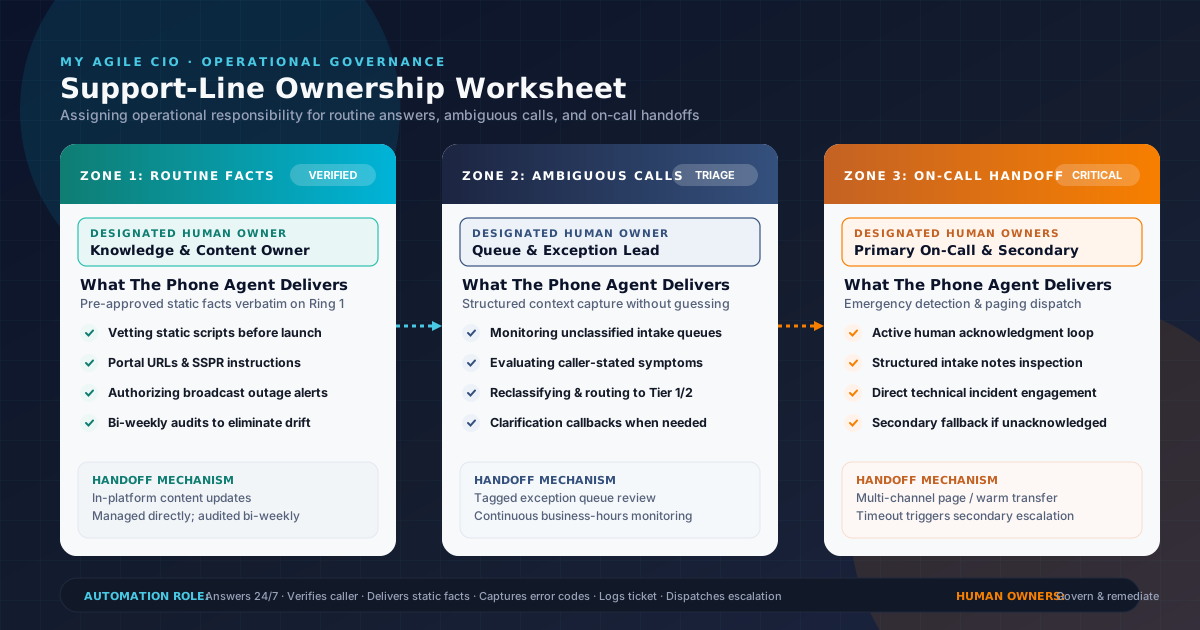
When an inbound IT support line fails, the breakdown is almost never a technical classification error. It is an operational ownership failure.
A caller calls about an unconfirmed outage, but nobody on staff was assigned to approve or update the broadcast message, so the phone agent gives conflicting guidance. An end user calls with a bizarre authentication error that does not trigger emergency paging, but because no human queue lead owns unclassified intake, the ticket sits untouched for twelve hours. Or an after-hours caller reports a server failure, the automated system dispatches a page, but nobody owns the acknowledgment loop, leaving the customer stranded.
Automating your support line with an inbound AI phone agent solves the first hurdle: answering on the first ring, capturing structured context, and applying configured triage logic 24/7. But technology only executes rules; humans must own the operational outcomes.
To build a dependable support line, an IT service desk manager, MSP owner, or fractional CIO must answer three fundamental governance questions:
- Who owns and updates the approved routine answers?
- Who reviews and handles ambiguous, unclassified calls?
- Who owns the on-call escalation handoff and acknowledgment loop?
Here is how to assign operational responsibility across your team using a structured support-line ownership worksheet.
1. Zone 1: Who owns approved routine answers?
In our guide on routine IT support phone answer boundaries, we established that an inbound phone agent should deliver only static, pre-approved operational facts—such as business hours, self-service portal links, password reset URLs, and hardware provisioning policies. It must never guess live infrastructure status, speculate on root causes, or improvise diagnostic steps.
However, static facts do not stay static forever. Client portals migrate, multi-factor authentication procedures change, holiday schedules shift, and temporary maintenance windows open.
The Operational Breakdown
When no individual owns the routine knowledge base:
- Callers receive outdated instructions (e.g., directed to a decommissioned self-service portal URL).
- Techs waste time correcting misinformed users.
- Support teams lose confidence in automated answering and revert to manual call handling.
The Designated Owner: Knowledge & Content Owner
Every support operation needs a named Knowledge & Content Owner (typically the Service Desk Supervisor, Tier 1 Team Lead, or designated MSP Operations Coordinator).
Core Responsibilities:
- Vetting initial answers: Reviewing and approving all static answer scripts before service launch during sales-assisted onboarding.
- Managing routine updates: Maintaining approved answers in the platform whenever client documentation, portal URLs, or support policies change.
- Broadcast status control: Authorizing temporary outage or maintenance announcements during known major incidents, and ensuring those broadcasts are removed immediately once resolved.
- Review cadence: Conducting a bi-weekly or monthly audit of automated answers against internal documentation to eliminate drift.
2. Zone 2: Who owns ambiguous and unclassified calls?
Most support calls fall neatly into standard categories: routine information requests, standard non-urgent service requests, or obvious critical emergencies. But a significant percentage fall into the ambiguous middle:
- A user reports that a core application “feels slow and weird,” but no error code is displayed.
- A remote worker cannot connect to a cloud service, but other team members appear unaffected.
- A caller demands immediate assistance for an issue that falls outside defined escalation criteria but claims executive visibility.
An automated phone agent can gather context—capturing the caller's identity, affected workstation tag, verbatim symptoms, and business impact—as outlined in our IT support triage checklist for on-call teams. But an automated line cannot make subjective business decisions or diagnose uncertain infrastructure health.
The Operational Breakdown
When unclassified calls lack a designated owner:
- Tickets sit in an unassigned triage queue, invisible to engineers focused on their active queues.
- Callers call back repeatedly, increasing call volume and user frustration.
- Minor issues quietly snowball into critical outages because subtle early warnings were ignored.
The Designated Owner: Queue & Exception Lead
Your organization must designate a Queue & Exception Lead (typically the Service Desk Dispatcher, rotating Tier 1 Triage Tech, or Service Delivery Manager during business hours).
Core Responsibilities:
- Monitoring exception queues: Reviewing tickets generated from calls that did not match predefined routine answers or automated emergency escalation paths.
- Evaluating gathered context: Reviewing the caller's stated symptoms, affected assets, and reported business impact captured during initial intake.
- Assignment and routing: Reclassifying the ticket and assigning it to the appropriate engineering tier (Tier 1, Tier 2, or specialty engineering team) based on actual technical complexity.
- Clarification follow-up: Reaching out to the caller if additional diagnostic details are required before dispatching an engineer.
3. Zone 3: Who owns the on-call escalation handoff?
The most critical moment in helpdesk operations occurs when an urgent incident arrives after hours or during peak overflow. As detailed in our framework on which support calls need an on-call escalation path, true operational emergencies require an immediate handoff to an on-call engineer.
An inbound AI phone agent can execute the handoff mechanism: identifying high-urgency criteria (e.g., total facility downtime, production server failure, or security breach indicators), compiling structured incident details, and initiating an on-call notification or warm transfer.
However, dispatching an escalation is not the same as completing an escalation.
The Operational Breakdown
When the handoff acknowledgment loop is unowned:
- An on-call engineer misses an SMS or voice page due to sleep, dead zones, or device misconfiguration.
- The customer assumes an engineer is already working on the issue, while the support team is completely unaware.
- Incident response time expands exponentially, violating client trust and contractual expectations.
The Designated Owners: Primary On-Call Engineer & Escalation Secondary
Escalation requires two explicit, named human roles:
- Primary On-Call Engineer:
- Receipt and acknowledgment: Actively acknowledging the incoming escalation within the organization's internal target window.
- Context review: Inspecting the structured intake notes (caller name, callback number, affected systems, verbatim error) before calling the user.
- Incident engagement: Contacting the caller or initiating technical investigation, taking full engineering ownership of the issue.
- Escalation Secondary (Backup / Operations Lead):
- Acknowledgment oversight: Receiving fallback alerts if the primary engineer does not acknowledge the incident within the designated timeframe.
- Resource reallocation: Stepping in to triage the incident directly or re-routing the escalation to an alternate qualified engineer.
- Closure verification: Ensuring the ticket status reflects active engagement and that the client is notified.
4. The Support-Line Ownership Worksheet
The following worksheet defines the division of operational responsibility across each phase of an inbound support line. Use this matrix to assign specific individuals or team roles before launching or updating your phone flow.
| Support Phase / Call Zone | What the Phone Agent Executes | Primary Operational Owner | Secondary / Fallback Owner | Handoff / Acknowledgment Mechanism | What Stays Exclusively Human-Owned |
|---|---|---|---|---|---|
| Zone 1: Approved Routine Answers | Delivers pre-approved static information (hours, portal links, SSPR instructions, asset guidelines) on the first ring. | Knowledge & Content Owner (Service Desk Lead / Operations Coordinator) | Tier 1 Team Lead | Content updates managed directly in-platform; verified via bi-weekly audit. | Deciding what information is authorized for public delivery; writing and updating answer copy; approving broadcast status alerts. |
| Zone 2: Standard Ticket Intake | Gathers caller identity, company, device tag, application, error description, and business impact; creates structured intake record. | Tier 1 Dispatcher / Triage Tech | Service Desk Supervisor | Structured intake record routed to standard ticketing queue; assigned during shift review. | Technical diagnosis; root-cause analysis; selecting troubleshooting scripts; user communication. |
| Zone 3: Ambiguous & Unclassified Calls | Captures complete caller symptoms and context without guessing; tags record as unclassified; logs intake for human review. | Queue & Exception Lead (Triage Dispatcher / Shift Lead) | Service Delivery Manager | Tagged exception queue monitored continuously during business hours; morning review for overnight calls. | Evaluating ambiguous symptoms; determining technical priority; contacting caller for clarification; dispatching to engineering tiers. |
| Zone 4: Urgent On-Call Escalation | Detects emergency criteria (site down, server offline, security alert); captures critical context; triggers configured on-call notification or live transfer. | Primary On-Call Engineer | Escalation Secondary (Operations Manager / Escalation Backup) | Multi-channel alert or warm phone transfer; requires active human acknowledgment. | Acknowledging the incident; performing technical remediation; making external client commitments; declaring resolution. |
5. Illustrative Scenario: Handling an Unscheduled Server Outage After Hours
The following walkthrough is an illustrative scenario demonstrating how operational ownership functions during an actual after-hours incident.
The Scenario
At 10:15 PM on a Tuesday, an employee at an accounting firm calls their MSP's support line. The firm is preparing for tax filing deadlines, and their central document server suddenly becomes inaccessible.
+----------------------------------------------------------------------------------------------------+
|                               ILLUSTRATIVE OPERATIONAL HANDOFF FLOW                                 |
+----------------------------------------------------------------------------------------------------+
|                                                                                                    |
|  10:15 PM  [ INBOUND CALL ]                                                                        |
|            * Phone answered immediately on Ring 1 by My Agile CIO.                                 |
|            * Caller explains: "Our document server is down and 15 accountants are blocked."        |
|                                                                                                    |
|  10:17 PM  [ CONTEXT INTAKE & EMERGENCY DETECTION ]                                                |
|            * Agent captures caller name, direct callback number, client domain, and server name.   |
|            * Agent identifies high-impact operational outage (widespread business stoppage).        |
|            * Agent executes configured on-call escalation route instead of routine morning queue.   |
|                                                                                                    |
|  10:18 PM  [ ESCALATION DISPATCH ]                                                                 |
|            * Automated phone flow dispatches structured intake note to on-call paging channel.     |
|            * Intake includes: client name, server hostname, impact scope, and callback details.    |
|                                                                                                    |
|  10:21 PM  [ HUMAN ACKNOWLEDGMENT — PRIMARY ON-CALL ]                                              |
|            * Primary On-Call Engineer receives alert on mobile device.                             |
|            * Engineer acknowledges notification within 3 minutes (preventing secondary fallback).  |
|            * Engineer reviews structured intake note before calling client back.                   |
|                                                                                                    |
|  10:25 PM  [ LIVE ENGINEERING INTERVENTION ]                                                       |
|            * Engineer connects directly with client lead, already knowing server name and scope.   |
|            * Engineer initiates server diagnosis and recovery.                                     |
|                                                                                                    |
|  Next Day  [ POST-INCIDENT OPERATIONAL GOVERNANCE ]                                                |
|  08:30 AM  * Knowledge Owner reviews if an active maintenance broadcast is needed.                 |
|            * Queue Lead verifies all related client calls were consolidated into the master issue. |
+----------------------------------------------------------------------------------------------------+
Operational Ownership in Action:
- The Automated Phone Agent ensured zero ring delays, asked the configured triage questions to capture server identity and user count, and executed the programmed escalation trigger. It did not speculate on why the server was offline or promise a fix time.
- The Primary On-Call Engineer owned the acknowledgment. Because the engineer confirmed receipt within the target window, the alert did not wake the Escalation Secondary.
- The Structured Handoff gave the engineer immediate context, allowing them to begin technical troubleshooting immediately without re-interviewing an anxious caller from scratch.
- The Queue Lead reviewed related overnight intake logs the next morning to ensure no duplicate tickets fell through the cracks.
6. Implementing Clear Ownership with My Agile CIO
Setting up an inbound IT support line does not require complex infrastructure overhauls or unproven automation. It requires pairing reliable, 24/7 call answering with crisp operational rules that your team controls.
My Agile CIO provides an inbound AI phone agent designed specifically for IT departments and MSP service desks:
- 24/7 Support-Line Answering: Answering every call on the first ring with your approved greetings and brand tone.
- Structured Context Capture: Gathering caller identity, workstation tags, error descriptions, and business impact before logging tickets.
- Configured Triage & Escalation: Distinguishing routine inquiries from urgent incidents and executing your exact routing rules.
- Human-Centered Control: Keeping technical diagnosis, incident management, and client commitments firmly in the hands of your engineering staff.
Clear, Predictable Subscription Terms
My Agile CIO operates under simple, transparent terms defined in our Terms of Service and How It Works:
- Standard Subscription: $299 per month, billed month to month.
- No Onboarding Fees: $0 setup or onboarding fee.
- Included Monthly Allowances: 500 inbound voice minutes and 500 SMS text messages per monthly billing period.
- Metered Overage Rates: Additional usage is billed at $0.20 per additional minute and $0.04 per additional SMS (with standard month-to-month flexibility).
- Sales-Assisted Setup: A sales specialist assists in configuring your initial call flow and escalation paths during onboarding. Subsequent changes can be made directly in the platform, with support available for additional guidance.
- Month-to-Month Flexibility: Cancel prior to your next billing cycle to stop renewal. Service remains active through the paid period; incurred overages remain due.
To review your escalation paths and map your team's support-line ownership, explore How It Works, review our IT Support Call Handling FAQ, or book a walkthrough with our team. You can also start phone service directly.