Which Support Questions Belong in Routine Phone Answers?
Setting clear boundaries between routine phone answers and technician triage keeps helpdesk lines responsive without guessing status or masking critical outages.
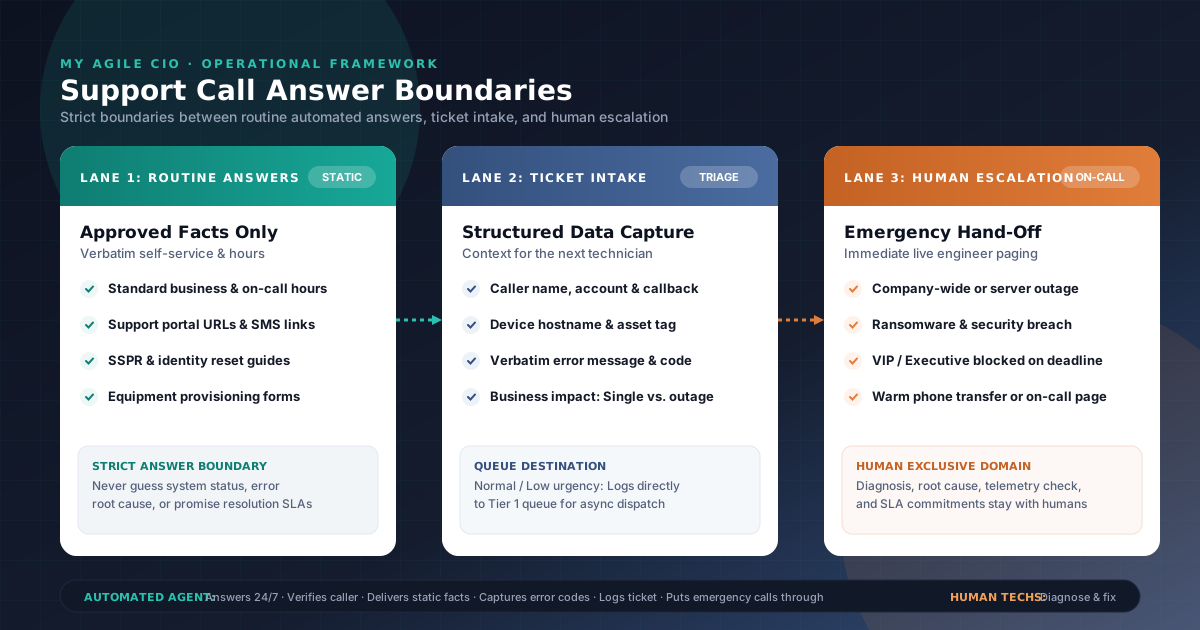
When an MSP or internal IT service desk decides to automate inbound phone answering, the most critical decision is not what the phone agent sounds like. It is deciding what the phone agent is authorized to answer, what it must log for technician intake, and what it must immediately escalate to an engineer.
If you set the boundary too narrow—treating the phone system like a dumb answering machine that merely records voice memos—callers get frustrated that basic questions cannot be answered, while technicians drown in transcription cleanup.
If you set the boundary too wide—allowing an automated agent to guess at system health, diagnose error codes, or improvise troubleshooting steps—you introduce severe operational risk. An agent that tells an executive “the email server is working normally” during an unfolding Exchange outage destroys trust and delays incident response.
To build an inbound support line that reduces ticket noise without compromising technical integrity, an IT organization must resolve three operational questions:
- Which questions qualify as routine answers versus issues that require intake?
- What caller context and urgency thresholds trigger technician triage or on-call escalation?
- Where does automated phone responsibility end and human engineering ownership begin?
Here is the operational framework for drawing those boundaries across your service desk.
1. Deciding which questions qualify as routine phone answers
A routine phone answer is an authoritative, verified piece of information that does not depend on troubleshooting, diagnostic evaluation, or real-time infrastructure state. If an answer requires evaluating an individual user's technical environment or checking unconfirmed system health, it does not belong in routine answers.
What belongs in routine phone answers: Approved static facts and verified self-service
Routine answers should be confined to stable, pre-approved facts that can be delivered verbatim to any authorized caller:
- Operating hours and support availability: Standard business support hours, holiday schedules, after-hours emergency coverage policies, and expected standard response windows.
- Support portal locations and authentication methods: Where users can access the self-service web portal, how to submit non-urgent requests online, or where to find knowledge base documentation.
- Standard self-service procedures: Approved, static self-service instructions—such as the exact web URL for an organization's self-service password reset (SSPR) portal or instructions for generating a multi-factor authentication (MFA) temporary access pass through corporate identity portals.
- Asset and ticket submission guidelines: Explaining what information a user should gather before opening a ticket (e.g., computer hostname, workstation tag, application error code) or how to submit a screenshot via email.
- Hardware provisioning and procurement policies: Standard procedures for requesting new equipment, standard equipment refresh cycles, or where departmental managers can submit hardware authorization forms.
What must NEVER be answered routinely: Changing status and diagnostic guesswork
The single greatest failure mode in helpdesk phone automation is attempting to answer dynamic or speculative questions. An automated phone agent must never guess or improvise on:
- Live incident and outage status (unless officially broadcasted): Callers frequently ask, “Is the network down?” or “Is cloud storage broken for everyone?” Unless your service desk operations lead has explicitly activated an approved, verified broadcast message for an active incident, the agent must never state that systems are “up” or “operating normally.” A caller calling about an outage might be the very first report of a major Sev-1 incident.
- Root cause speculation: Explaining why an application crashed, why an email bounced, or why a VPN disconnected. Root causes require telemetry, log inspection, and human diagnostic verification.
- Diagnostic troubleshooting advice: Never attempt multi-step diagnostic branching over the phone (e.g., “Try running this PowerShell script” or “Edit your registry settings”). Without seeing the machine state, automated suggestions can corrupt user configurations or exacerbate security incidents.
- Arbitrary SLA or resolution time commitments: Never promise an exact resolution time (e.g., “A technician will fix this in 15 minutes”). The agent may communicate published operational response targets, but committing to specific diagnostic turnarounds creates unmanageable contractual friction.
The Golden Rule of Helpdesk Boundaries: When a question requires checking live system telemetry, evaluating user permissions, or troubleshooting software behavior, the agent's job is not to resolve the issue. Its job is to capture complete context and log the intake.
2. Defining caller details and urgency thresholds
When a call falls outside routine informational answers, it moves into ticket intake and triage. To ensure human technicians can act immediately without calling the user back for missing basics, the phone agent must gather structured context before routing.
The five essential caller details every support ticket needs
As outlined in our guides on practical after-hours support intake and IT triage checklists, the phone agent should capture:
- Caller identity and contact: Full name, direct callback phone number, and corporate email address.
- Organization and account context: Company name, branch/office location, or client account identifier.
- Affected device or service: Computer hostname, asset tag number, operating system (Windows, Mac, mobile), or specific enterprise application involved.
- Problem description and exact error: What the user was doing, what failed, and the verbatim error message or numerical error code displayed on screen.
- Business impact and scope: Is the issue isolated to this single user, or are multiple colleagues/departments unable to work? Can the user continue working via an alternate method, or is their work completely halted?
Defining urgency thresholds: Normal intake vs. live technician escalation
Once caller context is gathered, the triage logic evaluates the call against predefined urgency thresholds to decide whether the ticket enters a standard queue or triggers immediate escalation.
| Urgency level | Operational scenario | Caller impact | Inbound phone routing action |
|---|---|---|---|
| Low / Standard | New software install, routine hardware request, how-to inquiry, minor formatting issue. | Single user; zero impact on core business workflow; workaround available. | Capture structured ticket intake; confirm ticket logging; queue for normal Tier 1 business-hours response. |
| Medium | Single-user application crash, printer connectivity failure, secondary monitor issue. | Single user degraded but partially operational; non-executive staff. | Capture full intake details with error codes; log high-priority ticket; dispatch to Tier 1 queue. |
| High | Critical line-of-business application crash for single user with deadline; executive/VIP completely blocked. | Single user completely halted on time-sensitive corporate function. | Capture intake; attempt warm transfer to on-duty Tier 1 technician during business hours; notify queue lead. |
| Critical / Emergency | Core server offline, complete office Internet outage, ERP/EHR down, suspected ransomware or security breach. | Entire department or company halted; customer transactions blocked; active data risk. | Capture core incident facts immediately; initiate on-call engineer paging or warm emergency transfer per configured escalation path. |
As detailed in our framework on which support calls need an on-call escalation path, true operational emergencies must never sit in an unmonitored ticket queue. They require an immediate, programmatic handoff to an on-call technician.
3. Establishing clear ownership between automated intake and Tier 1 / on-call technicians
A high-performing service desk maintains a crisp division of labor. Confusion arises when staff think the phone agent is doing diagnosis, or when callers believe the phone agent is an engineer.
Drawing clear ownership boundaries ensures that both the automated agent and human technicians operate within their core strengths:
+-----------------------------------------------------------------------------------+
|                            INBOUND SUPPORT LINE BOUNDARIES                        |
+-----------------------------------------------------------------------------------+
|                                                                                   |
|  [ AUTOMATED PHONE AGENT ]                                                        |
|  * 24/7 Call Answering on Ring 1                                                  |
|  * Verified Routine Answers (hours, portal links, SSPR URLs)                      |
|  * Caller Identification (name, company, callback number)                         |
|  * Context Gathering (device hostname, application, verbatim error)               |
|  * Business Impact Assessment (single user vs widespread)                         |
|  * Structured Ticket Intake & Logging                                             |
|  * Urgency Threshold Evaluation                                                   |
|                                                                                   |
|                                      │                                            |
|                  Does call meet live escalation criteria?                         |
|                                      │                                            |
|                   NO ────────────────┴─────────────── YES                         |
|                   │                                    │                          |
|                   ▼                                    ▼                          |
|  [ TIER 1 QUEUE / TICKETING ]            [ ON-CALL / LIVE ENGINEER ]              |
|  * Standard queue triage                 * Immediate phone transfer or paging     |
|  * Async ticket review                   * Priority incident acknowledgement      |
|                                                                                   |
|                                      │                                            |
|                                      ▼                                            |
|  [ HUMAN TECHNICIAN RESPONSIBILITIES (EXCLUSIVE) ]                                |
|  * Technical Diagnosis & Root Cause Analysis                                      |
|  * Live System Telemetry Verification                                             |
|  * Remote Access & Active Troubleshooting                                         |
|  * System Status & Outage Announcements                                           |
|  * Official SLA & Resolution Commitments                                          |
|  * Security Incident Containment                                                  |
+-----------------------------------------------------------------------------------+
What the Automated Phone Agent owns:
- Immediate 24/7 availability: Answering inbound calls immediately on the first ring, preventing abandoned calls and eliminating voicemail tag.
- Approved routine answers: Delivering static, pre-approved operational facts and verified self-service instructions verbatim.
- Structured context capture: Collecting complete, consistent ticket fields (caller identity, organization, machine ID, application, error message, business scope).
- Ticketing ingestion: Logging the gathered context directly into your ITSM or helpdesk system so technicians begin follow-up with structured data.
- Urgency evaluation and escalation routing: Detecting configured emergency triggers (such as widespread outage indicators or active security alerts) and executing live transfers or on-call notifications.
What Human Technicians (Tier 1 & On-Call) own exclusively:
- Diagnostic investigation and troubleshooting: Determining why an error occurred and applying corrective configuration changes, script executions, or patch remediation.
- System status determinations: Formally verifying whether an infrastructure component is healthy, degraded, or offline.
- Service level agreements and commitments: Communicating binding resolution timeframes or contractual delivery commitments to client stakeholders.
- Security triage and policy decisions: Managing compromised credentials, isolating infected endpoints, and invoking incident response policies.
- Closing tickets: Verifying with the user that the technical problem is fully resolved before marking the incident closed.
By enforcing this division, your technicians are freed from repetitive administrative intake, while your callers experience calm, consistent, and accurate first-contact handling.
4. Structured decision table: Routine answer vs. triage vs. escalation
Use this operational decision table to configure your helpdesk phone call flows. It maps common caller scenarios to their appropriate boundary, action, and ownership:
| Call scenario / Caller question | Boundary classification | Automated phone action | Human technician / On-call ownership | Rationale |
|---|---|---|---|---|
| “What are your standard support hours and where is your ticket portal?” | Routine Answer | Deliver approved business hours and portal URL verbatim; offer to text portal link via SMS. | None required. | Static, pre-approved information with zero diagnostic complexity. |
| “How do I reset my password while working from home?” | Routine Answer / Intake | Provide official SSPR portal web link and instructions; if user cannot access self-service, capture identity and log ticket for technician password reset. | Tier 1 technician verifies caller identity per security protocol and executes reset if self-service fails. | Self-service directions are routine; manual password resets require technician security verification. |
| “My Outlook keeps crashing when I open a PDF attachment.” | Structured Intake | Capture user name, PC name, Outlook version, exact error message, and confirm work impact; log structured ticket. | Tier 1 technician reviews error details, inspects application crash logs, and contacts user to remediate. | Technical troubleshooting requires diagnostic inspection; cannot be guessed over the phone. |
| “I need Adobe Acrobat installed on my new laptop.” | Structured Intake | Capture software name, business justification, device asset tag, and manager approval status; log provisioning request. | Service desk administrator verifies software licensing, secures approval, and schedules deployment. | Administrative request governed by procurement and licensing rules. |
| “Is the server down? Nobody in our accounting department can open the billing software.” | Escalation / Urgent Triage | Recognize multi-user/department impact; capture caller name, accounting office location, and specific error code; immediately initiate warm technician transfer or page on-call engineer. | On-call / Senior systems engineer immediately verifies server health, initiates incident management, and updates team. | Multi-user outage halts revenue operations; requires immediate engineering attention, not standard queueing. |
| “I clicked a link in a suspicious email and my screen locked with a ransom note.” | Emergency Security Escalation | Recognize cybersecurity keywords; instruct user to immediately disconnect Ethernet cable and disable Wi-Fi; initiate urgent emergency on-call transfer. | Security operations / On-call engineer immediately isolates host, inspects network telemetry, and begins incident containment. | Active cybersecurity threat poses severe corporate risk; requires instant containment protocol. |
| “When will ticket #48291 be resolved? I've been waiting two hours.” | Intake / Technician Review | Lookup ticket record if configured or capture ticket ID; acknowledge caller inquiry; notify assigned technician of user follow-up without promising a resolution time. | Assigned technician or service desk dispatcher reviews current ticket progress and contacts user directly with update. | Resolution commitments must be made by the technician performing the work, not an automated system. |
5. An illustrative scenario: How an MSP configures call boundaries for a professional services client
To see how these boundaries operate in a real-world helpdesk environment, consider the following scenario:
Illustrative Example
Apex Managed Solutions is a regional MSP providing IT infrastructure and helpdesk support for Crestview Financial, a 65-person wealth management firm. During tax season, inbound support call volumes spike significantly.
- Setting routine answers: Apex configures My Agile CIO with approved static answers for Crestview: standard support desk hours (7:00 AM–6:00 PM CST), the client portal URL for non-urgent requests, and the self-service MFA reset link. When callers ask for basic operational guidance, the agent answers instantly and offers an SMS link.
- Handling structured intake: At 10:15 AM, a portfolio manager calls stating their Bloomberg terminal add-in within Microsoft Excel is generating an “ActiveX automation error.” The agent does not attempt to troubleshoot Excel. Instead, it captures the manager's full name, direct desk phone, computer hostname (
CREST-WS-042), exact error text, and confirms that other applications are working normally. It logs a structured Tier 1 ticket into Apex's ticketing queue. The technician receives complete diagnostic context and connects via remote management within 20 minutes with the correct fix ready.- Executing emergency escalation: At 7:45 PM on a Tuesday, an executive assistant calls stating that none of the partners can access the primary client document repository on the network share. Recognizing a multi-user, department-wide outage after normal business hours, the agent does not file a routine ticket. It captures the assistant's callback number, identifies the affected file share server, and immediately triggers an on-call escalation page to Apex's primary systems engineer per Crestview's after-hours escalation protocol. The engineer acknowledges the alert within four minutes and restores the file service before morning market open.
This scenario is an illustrative example designed to demonstrate support boundary configuration; it does not represent an actual customer endorsement, named ITSM integration, or guaranteed service level.
6. How My Agile CIO delivers first-line triage and escalation
My Agile CIO is purpose-built to sit at the front line of your IT and MSP support operations, providing structured intake and dependable routing around the clock.
Clear, transparent subscription terms
Under the My Agile CIO terms of service and how it works:
- Base subscription: The standard AI Phone Agent subscription is $299 per month, billed month to month.
- No setup or onboarding fee: There is no setup fee or onboarding fee ($0). Your initial call flow is established with sales assistance as part of starting service.
- Monthly usage allowances: Each monthly billing period includes 500 inbound voice minutes and 500 SMS text messages.
- Predictable metered rates: Additional usage above monthly allowances is billed at $0.20 per additional minute and $0.04 per additional SMS.
- Flexible cancellation: You can cancel before the current billing period ends to prevent the next renewal. Service continues through the paid period; overages already incurred remain due. Prepaid monthly service refunds are considered case by case.
Sales-assisted initial flow setup and ongoing flexibility
- At setup: A sales agent helps you establish your initial support call flow—mapping your approved routine answers, ticket intake fields, queue destinations, and emergency escalation thresholds.
- Ongoing maintenance: You can make subsequent changes directly within the platform as your support policies evolve, with support available for additional assistance.
Put calm, structured triage on your front line
Automating your support phone line should not mean gambling with unverified answers or losing critical outage signals in a generic voicemail box. By establishing clear operational boundaries between routine answers, structured intake, and technician escalation, you protect your engineers from administrative noise while delivering instant, dependable responses to your users.
- Ready to configure your support line? Start phone service directly or book a walkthrough to review your call flow with our team.
- Explore the operational workflow: Learn how our four-step triage model works on How It Works.
- Review common evaluation questions: Visit the My Agile CIO FAQ.
- Deepen your triage design: Read our practical guides on A practical after-hours support intake, Which support calls need an on-call escalation path, and An IT support triage checklist for on-call teams.